Showing posts with label Navisworks Freedom. Show all posts

Wednesday, January 29, 2014

Navisworks 2014 Hotfix 3

Autodesk just released a new Hotfix for Navisworks (all flavors) and it fixes/resolves the following issues…

- Problems resulting from operations that involve clicking in the first column of the Clash results grid, such as collapsing/expanding groups, dragging clashes and resizing columns.
- Issues with material and transparency inconsistency when importing FBX files.
- Issues with the automatic selection of the correct Rendering engine (Presenter or Autodesk)

Note: it is not necessary to have installed Navisworks 2014 Service Pack 1 before installing this hotfix

You can download the appropriate version HERE

Monday, January 28, 2013

Hidden Update in Service Pack 2

Well, at least it seems like it was a hidden update to me.  What I’m talking about is a feature that people have been asking about for a while…being able to save a Clash Report to Viewpoints in Navisworks. 

Technically it’s not a new feature, you’ve been able to do it for as long as I can remember.  But, it’s never REALLY worked.  The resulting saved Viewpoints never kept the “visual” settings when looking at the Clashes in the Results tab of the Clash Detection panel.  So the results were really just the camera position with elements in their native color and none of the elements in front of the clash hidden or transparent or wireframed or etc.

Here’s the Clash Results Viewpoint (while having the Results tab “active” in Clash Detection)…

Audubon Center-ClashReport

Prior to Navisworks 2013 Service Pack/Update 2, this was the result of the “Saved Viewpoint” when the Report was exported to Viewpoints…
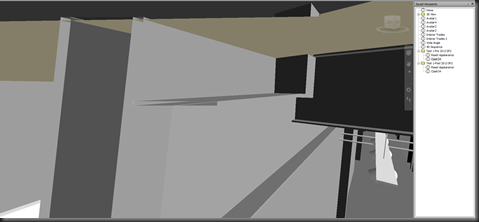
Audubon Center-ClashReport-VP_PreSP2

And now, here’s what you get with Navisworks 2013 after Service Pack/Update 2 is installed…

Audubon Center-ClashReport-VP_PostSP2

FINALLY, the report exported to “Viewpoints” actually shows the same view settings as the Results tab does!  This means that when the NWF is Published to a NWD, someone with Freedom (or Simulate) can actually review clashes!

But, there is a bit of bad news.  It appears that any Redlines that are created on the Clash do not come through.  However, if you create a Redline Tag, the associated Comment WILL come through and be available in the Viewpoint…which doesn’t really help since you can’t see the Redline Tag.  Also, if you add a Comment and/or an Assign(ment), those will also come through and be available in the Viewpoint.

I’m glad to see the progress has been made to make the Viewpoints Report capture the Results visual settings.  Hopefully we’ll see some more improvement to also capture the Redline information.

Wednesday, September 19, 2012

Navisworks 2013 Service Pack 2

Looks like another service pack for the Navisworks family of products was recently released (short list of updates via Beyond Design)…

  • Performance issues when working with a large volume of selection and search sets.
  • Issue where some commands appear disabled after dragging a selection set to a folder.
  • Show command didn't work at the folder level for sets hidden in folders.
  • Crash when trying to drag a set into a folder.
  • Area/Volume properties from Revit Drawings not available.
  • Inventor models are rotated at 90-degrees.
  • A number of unexpected crashes in Clash Detective
  • Unhide All taking much longer when Clash Detective is open.
  • Not possible to rename a Clash result after a drag and drop.
  • Clash groups expand unexpectedly.
  • Renaming results in the Clash results grid performance issues.
  • Resolved a performance issue where loading a model is extremely slow when Timeliner is open.
  • 2D measurement start, end and difference values are incorrect.
  • Cancelling or closing the options editor using keyboard shortcuts retains options.
  • Cinepak Codec for 64 bit is now available.
  • CSV export from Selection Inspector now available

As always, make sure you read the Readme file before installing…the Readme also includes a full list of updates. 

Also make sure you download and install the appropriate version (32bit vs 64bit, as well as Freedom, Simulate or Manage).  Please notice there is also a download for the Navisworks Exporters, so you’ll want to install that as well if you are exporting files to NWC from (for example) AutoCAD or Revit.

Download - Autodesk ® Navisworks ® 2013 Service Pack 2

Wednesday, April 4, 2012

Navisworks 2013

Wow, the first part of 2012 has been a busy one!  As you are all probably already aware, the Autodesk 2013 products were introduced on March 27.  Instead of relisting the New Features for 2013, I’ll point you to Paul and Lee over at Beyond Design.  They have a nice list of the new features as well as a couple new posts about some of the features, like Grids and Levels!

As I get some more face time with Navis 2013, I’ll be posting about some of the new features that have been presented and ones that maybe weren’t as “advertised”.

Tuesday, January 3, 2012

Selection Tree and Revit Objects

This is something that I get asked quite a bit…when I load in a Revit file into Navisworks, why do things like Columns or Doors (as examples) always show the Type Name twice?

If you’re not sure what I’m talking about, here’s a little screen shot…

image

As you can see, the W10x49 has a “sub component” also called W10x49.  What you are really seeing here is the Element and the Type (respectively).  To help explain this a little further, here’s each one selected and the associated “Element” properties…

image  image

As you can see in the image on the left, the Properties for the first item selected displays the Instance Properties of the Revit object.  On the right image, you can see the next item in the list is selected, which is now displaying the Type Properties.

So when you see Revit objects with what seem to be duplicate names, you are actually seeing the Instance and the Type.  One thing to note, this isn’t the same for all Revit objects.  Take Walls for instance, Navisworks only lists out the Instance and the actual geometry (as shown in the top image).

From what I can tell, this helps separate out the Properties and the number of tabs that are displayed.  But, there is an issue with having all of these properties broken out like this, specifically the Element ID!  This ties back to the Switchback post…if you try and use Switchback with the Type selected, it won’t find the object.  And, that’s not all…it also affects your Clash Detection reports!  More to come on that subject soon….

Monday, September 26, 2011

Navisworks 2012 Service Pack 1 Available

Yes, you may have already heard about this being available, but I wanted just reiterate that the first Service Pack/Update for Navisworks (Manage, Simulate, Freedom) 2012 is available.  You can download the update HERE.  As usual, make sure you download the appropriate version for your OS (32bit vs 64bit).

Also, make sure you look at the available download links…there is a separate download for the NWC Exporters as well.  This is available for those of you who only have the Exporters installed, you don’t actually have Navisworks installed.  If you have Navisworks installed and install the Navisworks update, you do not need to install the Exporter update as well…this is already in the Navisworks update package.  See the comment below from Lee (Beyond Design blog) regarding the Exporter Update…I was slightly incorrect on the above comments about the Exporter Update.

“If you installed Navisworks Manage or Simulate 2012 or the standalone NWC Exporters prior to September 2011, then you should install the separate updated Exporters, this is NOT contained in the Service Pack.”

As for the list of updates, take a look at the PDF HERE.

Friday, June 3, 2011

BIM and Construction Utilizing the Autodesk 2012 Products

Back in the first part of April, I did a few webcasts around the Autodesk 2012 products and how they fit into a BIM workflow for Architects and Construction firms.  We did record the sessions and I’ve linked below a recording of the BIM for Construction webcast that I did.  It’s about 40 minutes long and since this was done for the company I work for, you get a few minutes of MasterGraphics information at the beginning. 

Hope you enjoy and definitely contact me if you have any questions!!

BIM For Construction Utilizing the Autodesk 2012 Products

Wednesday, March 23, 2011

Navisworks 2012 Availability

UPDATE: Navisworks 2012 Available for Download

Now that the information is out about the new 2012 Autodesk products, the questions start coming up on when the 2012 products will be available. 

First things first, 2012 will be the same as 2011…it’s going to be available as a download for Subscription Customers unless you specify you want a disk.  So keep an eye out for an email from Autodesk Subscription (if you are a Subscription site manager for your company) as you’ll get your new serial number and notification that 2012 is available for download.

As for the date, the Navisworks 2012 products will probably be available around mid April based on the past couple years.  Remember, this is not a 100% certainty and is purely a guess, Autodesk has the right to provide the download/ship the disks at a earlier or later timeframe.

Hope you enjoy the new 2012 products!

Tuesday, March 22, 2011

New Features for Navisworks 2012

Here’s a quick peek at the new Features for the Navisworks 2012 family of products…which is Manage, Simulate and Freedom Viewer.

Navisworks Manage and Simulate

  • User Interface Updates (Navigation Tools on Ribbon)
  • Timeliner Updates (Interface, Tab Integration)
  • Clash Detective Updates (Assign Clashes, Wireframe Mode, Batch Updates) (Only Manage)
  • 2D DWF & DWFx File Support Enhancements
  • Revit Interoperability (Linked Files, Construction Modeling support, Revit Switchback)
  • Vault Integration
  • Appearance Profiler (Assign Colors per Props, Import/Export)
  • Miscellaneous Enhancements (Avatars, FBX Materials)

Navisworks Freedom Viewer

  • Measurement tools
  • 2D DWF & DWFx
  • Gantt Chart Visible

As time goes on, I’ll be posting more about the new features, so stay tuned!